2021 has only just begun and we’re kicking off the new year with our latest feature release.
The Insurwave platform now enables you to:
Download and regenerate documents, such as Certificates of Insurance and Letters of Undertaking as well as to filter documents by asset name, flag, business unit and more
Capture local insurer names and addresses to support management of fronting arrangements
Adjust premiums manually to support non-standard endorsements
Update ownership types for an asset as they change during the policy term, for example, the removal of a Mortgagee
Find out more about the new features below!
Documents
Downloading and regeneration of documents
You can now download and regenerate your Certificates of Insurance and Letters of Undertaking on Insurwave!
When viewing the Program, you can now click on the ‘Documents’ tab (1). Here you will be able to see the documents that have been generated for your assets.
Clicking on the ellipsis (2), you will be able to ‘Download’ documents to view, or ‘Regenerate’ documents after making changes to your asset details, such as a change of flag.
Filtering documents
To help you find your documents more easily, you can click on the filter icon (1). You will be able to filter for documents by Asset Name, IMO No., Flag, Document Type and Business Unit (2). You can also use a combination of them to refine the search even more!
Note: Documents are only available if you have provided Insurwave with your document templates.
Local Insurers and Fronting
When your program is in draft you can now add local insurer name and address details for assets managed under a fronting arrangement (1). This information can then be automatically added to required insurance certificate documentation generated for your program.
Clicking on the ellipsis (2), you will be able to ‘Download’ documents to view, or ‘Regenerate’ documents after making changes to your asset details, such as a change of flag.
You can now add a custom premium entry for when your asset is ‘Laid Up’ or for an ‘Other’ reason. This means you can now adjust premiums automatically for standard events and make manual premium adjustments for non-standard endorsements, such as an additional premium for an ice risk.
In order to add a premium adjustment, you will enter the rate (1) for the impacted period (2) and we will inform you of the premium amount (3).
Manual Premium Management
Custom Premiums
In order to manage your premiums manually, select “Premiums” (1) from the menu on the right and click the “Edit Premium Lines” (2) button.
Cancel Premium
If you do make a mistake adding a custom premium you didn’t mean to – don’t worry!
You can cancel that line by simply clicking the “x” (1).
We will keep a record of the original premium on the program and will then balance this adjustment with the cancelled premium.
Update ownership types for an asset
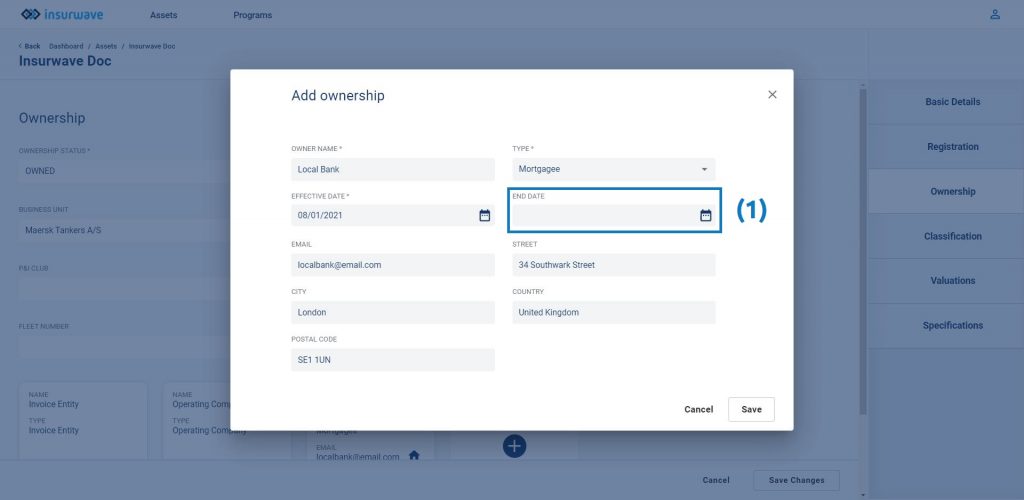
You can now update ownership types that no longer have a related interest to your asset, such as mortgagees. When editing an ownership type, you will now see an ‘end date’ (1), populate this with the last day of their interest.
Note: Any new documents that are produced will no longer include their details or list them as an interested party but we will keep a record of the previous version.